

Slotrave New Zealand App | Download for iOS & Android
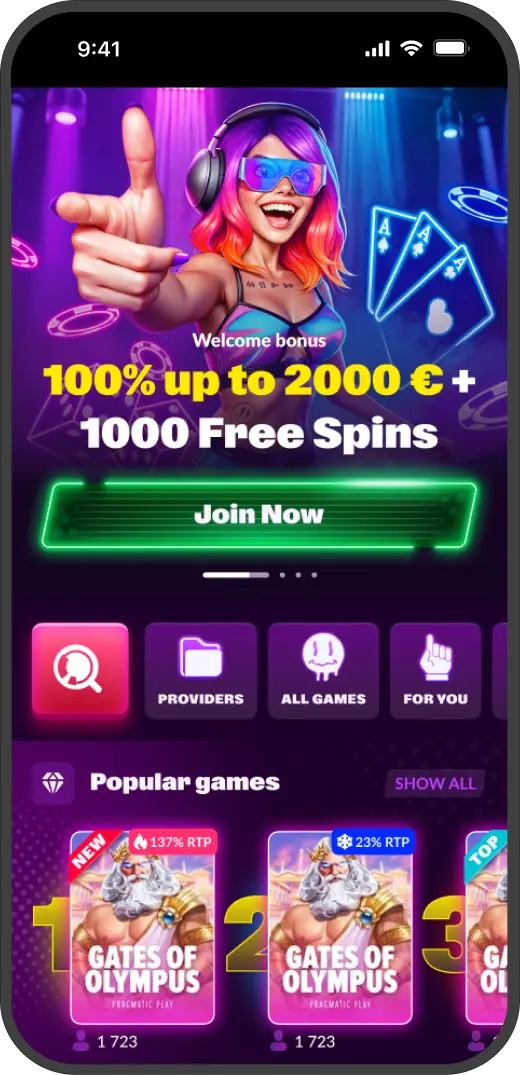
Slotrave New Zealand App — The Rave in Your Pocket
The app ended up becoming part of my daily habit, which I did not expect. Usually, testing a casino on mobile goes the same way every time. Install it, tap through a few menus, make sure things load properly, then go back to the computer. That routine almost never changes. But Slotrave kept me reaching for my phone while the laptop sat untouched. It was not some conscious decision to try harder. The experience just felt smoother, lighter, like nothing was lost by staying on the smaller screen.
Honestly, most casino apps feel like they were bolted on as an afterthought. This one did not. It was not just about ticking the mobile box. The real test was whether I would pick it up even with my laptop sitting right there. Plenty of apps technically function — that is a low bar. But here, without planning to, I kept tapping the phone first. Slotrave caught me off guard. I never expected to stop bothering with the browser. One tap became the new default. The phone screen lit up before the desktop ever woke up.
Available on the App Store and through Google Play, with an APK version ready for Android users who prefer a direct download. Everything below covers how to get it, how to use it, and what you will find once it is running.
Getting Slotrave on Your iPhone or iPad
The iOS installation is as simple as any app you have ever grabbed. No workarounds, no special settings, no configuration files to mess with.
- Open the App Store on your device.
- Search for Slotrave.
- Tap Get, then Install.
- Wait for the download to finish — it is under 100MB, so even on mobile data this takes seconds.
- Open the app and log in with your existing account, or set up a new one.
 Download the
IOS app
That is genuinely all there is to it. If you have ever installed any app on an iPhone, you already know the drill. Slotrave does not add extra steps or verification hurdles. The app runs on iOS 12.0 and later, which means even devices from several years back will handle it without drama. Kiwi players still running an older iPhone will have no trouble getting started.
Two Ways to Get Slotrave on Android
Android gives you choices. You can take the standard Google Play route, or download the APK straight from the Slotrave website. Both work. The difference comes down to preference and how you want to handle updates.

Option 1 — Google Play Store
- Open Google Play on your Android device.
- Search for Slotrave.
- Tap Install.
- Open the app once it finishes downloading.
 Download the
android app
This is the easier path. Updates roll out automatically in the background, just like any other app on your phone. If you do not want to think about version management, this is the route to take.

Option 2 — APK from the Slotrave Website
If you would rather go direct, you can grab the APK file from the official Slotrave site.
- Open your browser on your Android device and head to the Slotrave website.
- Find the download section — it is easy to spot.
- Tap the Android APK download link.
- Your phone will ask you to allow installations from unknown sources. This is normal for any app downloaded outside of Google Play — not a security risk when you are getting it from the official site.
- Open the downloaded file and tap Install.
- Launch from your home screen or app drawer.
Download theandroid app
One thing to keep in mind: only download the APK from the official Slotrave website. Third-party APK sites can host tampered versions, and that is a risk you do not need when the real thing is right there. With the APK method, you will need to update the app manually when new versions come out. Not a major hassle, but worth knowing ahead of time.

What the App Actually Does Well


What Your Device Needs to Run It
Slotrave is not one of those apps that needs the newest hardware to work properly. The requirements are kept deliberately modest, which means a broader range of devices can handle it without lagging or overheating.
iOS 12 dates back to 2018. Android 7 dates back to 2016. That casts a wide net. If your phone is from the last seven or eight years and still powers on, there is a good chance the Slotrave app will run on it. I tested it on an older device specifically to see what would happen — games loaded fine, the interface stayed smooth, and live streams were watchable. Heavier games with complex animations took a moment longer to load, but once running they played without issues. New Zealand players do not need the latest flagship to get a solid experience here.
Storage is minimal at under 100MB. The app is not going to cut into your photo library or force you to clear out other apps to make room. And the 2GB RAM recommendation is just that — a recommendation. Most smartphones made in the last several years meet or exceed this without any trouble.
| Requirement | Specification |
|---|---|
| iOS Version | iOS 12.0 or later |
| Android Version | Android 7.0 or later |
| Storage Space | 100MB free |
| RAM | 2GB recommended |
| Connection | WiFi or mobile data |

If You Would Rather Skip the Download
Join NowSlotrave App — Common Questions
-
Is the app free?
Completely. App Store, Google Play, APK — all free. The only money involved is what you choose to deposit, same as on the website. -
Do I need a separate account?
No, and this is one of those things that should be obvious but somehow is not at every casino. Your existing Slotrave login works on the app. Balance, bonuses, VIP progress — it all carries over. One account across everything. -
What about battery life?
Live dealer sessions will drain your battery faster than regular slots. That is true for every casino app, not just this one. If you are planning a longer live session, keep a charger nearby. For standard slot play the battery draw is pretty reasonable. -
The app is not showing up in my store. Now what?
Regional availability can vary. If you are in New Zealand and the app does not appear in your store, Android users can get around this entirely by grabbing the APK from the Slotrave website. iOS users — the mobile browser version is your best option, and it works well enough that you will not feel like you are missing anything. -
How do updates work with the APK?
If you installed through the App Store or Google Play, updates happen on their own. APK users need to check the Slotrave site for newer versions and download them manually. Slightly less convenient, but you stay in control of when updates land. -
Can I try games without depositing?
Demo mode works on the app the same way it does on desktop. Most slots let you spin with play money. Live tables are the exception — real dealers need real bets. -
Is it as secure as the desktop version?
Same encryption, same protocols, same everything under the hood. The app is not a separate system — it connects to the same infrastructure. Your data is handled identically no matter which screen you are using.

One Last Thing Before You Go
Join Now
-
 SlotRave Finland
-
 SlotRave Slovensko
-
 SlotRave Portugal
-
 SlotRave România
-
 SlotRave Slovenija
-
 SlotRave Australia
-
 SlotRave Polska
-
 SlotRave Italia
-
 SlotRave Norge
-
 SlotRave Magyarország
-
 SlotRave España
-
 SlotRave Ireland
-
 SlotRave Schweiz
-
 SlotRave Argentina
-
 SlotRave Canada
-
 SlotRave Česko
-
 SlotRave Chile
-
 SlotRave Danmark
-
 SlotRave Deutschland
-
 SlotRave Österreich
-
 SlotRave Canada(FR)
